The trading bot for QFEX

QFEX Trading Bot: Venue Overview & Guide

Vesper trades the S&P 500, Nasdaq, gold, Brent and copper on your own QFEX account. Nothing to install, no code to write. Choose a market and a size, press Start, and stop it whenever you want.

168 ha week, weekends too
No coderuns in the browser
One tapto stop
Vesper · QFEX · choose a market
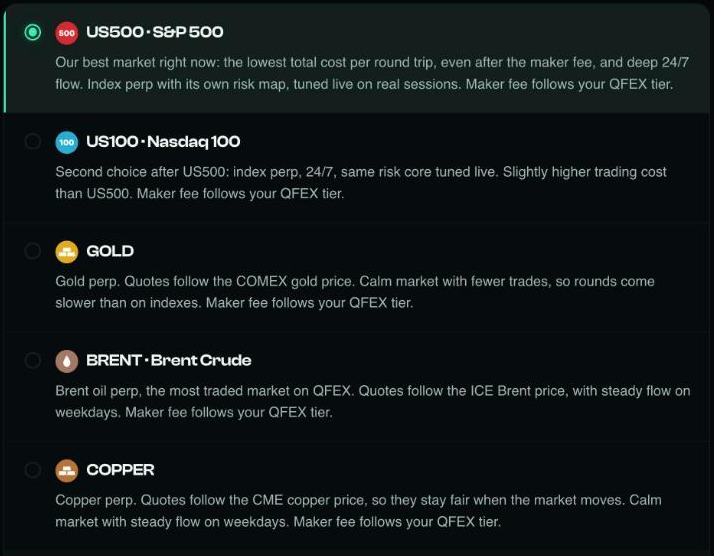
Vesper's QFEX market list: US500, US100, gold, Brent and copper, each with a short note
SessionQFEX
US500S&P 500 index
$500size
Saturdaystill trading
RunningStop
Sun 03:14 · stock exchange closed, QFEX open
US500S&P 500, deep around the clock
US100Nasdaq 100 index
SNDKSanDisk stock
GOLDfollows COMEX gold
BRENTQFEX's busiest market
COPPERfollows CME copper
MonTueWedThuFriSatSun
168hQFEX trading hours a week
Why QFEX, why a bot

The stock market sleeps. QFEX doesn't.

The New York Stock Exchange is open for about 32 and a half hours a week. QFEX trades the same names every hour of every day, including weekends. Nobody can watch a screen for 168 hours. A bot can.

QFEX

168 h

Index, stock and commodity perpetuals, every day.

NYSE regular session

32.5 h

9:30 to 16:00 New York time, Monday to Friday.

Ranked

Five ways to automate QFEX

3Commas, Pionex, Cryptohopper and the other big bot platforms don't connect to QFEX. These do. They're ordered by how fast someone who doesn't code gets a strategy running.

01

Vesper

Running today, no code

A bot made for QFEX. Connect your account, pick a market and a size, press Start. It keeps trading in the cloud after you close the laptop.

Strong

  • Running in minutes
  • Made for QFEX's stock, index and commodity markets
  • Start, settings and Stop on one screen

Trade-off

  • You set market and size; the strategy is Vesper's
02

Your own bot on the QFEX API

For developers

QFEX publishes a WebSocket and gRPC API, an official command-line tool and a test exchange with no real money.

Strong

  • Every order is yours to design
  • Free test environment

Trade-off

  • You write, host and watch it
  • Outages and restarts are yours
03

QFEX's own order tools

For working one large order

TWAP, stop and close-position orders, built into QFEX.

Strong

  • Nothing to connect

Trade-off

  • An order type, not a strategy that keeps going
04

An open-source framework

For builders with spare weeks

Hummingbot and projects like it are powerful. When we checked, none listed a ready QFEX connector.

Strong

  • Large strategy library

Trade-off

  • You'd build and maintain the QFEX connector
05

Trading by hand

The baseline

Your own limit orders in the QFEX app.

Strong

  • No setup

Trade-off

  • Trades only while you watch
Side by side

What each option asks of you

The same five questions for every option. Swipe the table sideways.

Vesperhosted botOwn API botyou build itQFEX TWAPbuilt-in order3Commas, Pionexbig platforms
Connects to QFEXYesYesYesNo
Code to writeNoneAll of itNone—
Keeps trading by itselfUntil you press StopWhile your server is upUntil the order fills—
Nights and weekendsCoveredIf you host itPer order—
Time to first tradeMinutesDays to weeksMinutes—
Built for QFEX

Small things that make it easy

Details that save a first-time QFEX trader the most time.

Markets explained in plain words

Each QFEX market comes with a short note on how it behaves, so you can choose without guessing.

Weekends are trading days

QFEX stays open on Saturday and Sunday, and so does your session. It runs until you stop it.

Two ways to connect

Sign once with the wallet you use on QFEX, or paste a QFEX API key if you signed up with Google or email.

Every trade on your record

Trades appear in your own QFEX history, and Vesper shows each session's volume and result.

Get started

From zero to the first trade

Most people are running within five minutes.

1

Open Vesper

Connect the wallet you use on QFEX. One signature, no transaction and no gas.

2

Connect QFEX

Sign once more, or paste a QFEX API key. Vesper checks the account right away.

3

Choose and Start

Pick US500, gold or another market, set the size and press Start.

Questions

QFEX bots, answered

Does QFEX have its own trading bot?

QFEX gives you an API, a command-line tool and order types such as TWAP, but no strategy bot. Vesper is an independent bot that connects to your QFEX account.

Do I need to code or keep a computer on?

No. Vesper runs in the cloud. You control it from a browser on your laptop or phone.

Which QFEX markets can Vesper trade?

The US500 and US100 indices, SanDisk stock, and commodities including gold, Brent and copper. The current list is always in the market picker.

Can I lose money?

Yes. Any trading bot can lose money, and leverage makes losses bigger. Start with a size you're comfortable with.

Let QFEX trade
while you're away.

Connect your account, choose a market, press Start.

Start on QFEX

Checked 2026-11-17 · source: docs.qfex.com

Fees, funding and price movement can cause losses. Funds stay in your own exchange account. Points do not guarantee a payout. This is not financial advice.

Points and airdrop

−30%Get 30% of your QFEX fees backOpen your QFEX account with Vesper's link, qfex.com/@Vesper, and 30% of your trading fees come back to you. It works for manual trading and for trading with Vesper.