


What the bot is actually doing
Delta-neutral holds two opposite positions of the same size on two exchanges. Vesper places a patient maker order on Arcus. The moment it fills, Vesper sends the opposite order to RISEx, usually in under a second. Long on one side, short on the other: if the price goes up or down, one leg gains what the other loses.
So where does the result come from? Three things. The gap: the same coin trades at slightly different prices on the two venues, and Vesper opens the pair when that gap is in its favour and closes it when the gap comes back. Funding: a small periodic payment between longs and shorts; Vesper picks the side that gets paid when a payment falls inside the round. Fees: every fill on both venues costs a little, mostly the instant hedge on RISEx.
All of that becomes one number: CPM, the cost per $1 million traded. Lower is better. A round is one open-hold-close cycle; Vesper repeats rounds until you press Stop.
- Open
Places a maker order on Arcus as soon as the market is calm — it does not wait for a price gap between the venues. Every fill is hedged on RISEx at once.
- Hold
Keeps both legs open for the time you chose. A ring on the dashboard counts down. You can add 10, 30 or 60 minutes.
- Close
Closes both legs the same way, again waiting for a good gap — at most 15 minutes, then it closes at any gap.
Delta-neutral does not mean risk-free. The two legs are on two different exchanges, fills can be partial, prices can jump, and fees always apply. Results are not guaranteed; some rounds end slightly down.
USDC on both venues
Vesper trades from two accounts at once, so each needs its own money: USDC on Arcus and USDC on RISEx, from the same wallet. Keep the two amounts close — each leg needs margin of its own.
Let Vesper be the only bot trading on this RISEx account. Another bot on the same account at the same time can slow down the hedge.
- Arcus
Deposit USDC to your Arcus account. This is the maker leg.
- RISEx
Deposit USDC to RISEx. This is the hedge leg; its fees are the main cost of a round.
- Buffer
Vesper always keeps 35% of each balance aside. The rest is the most it will put to work on each venue.
The dashboard shows both balances side by side, with a gold/green bar. If they drift far apart, the Balance tile turns amber and says rebalance.
One wallet, both legs
Open the connect page, pick the Delta-neutral · Arcus + RISEx tile and press Sign in. You sign a few short messages: one to log in, then one trade-only key per venue. The keys can place and cancel orders only — they cannot withdraw. When both rows say Connected, press Open Vesper.
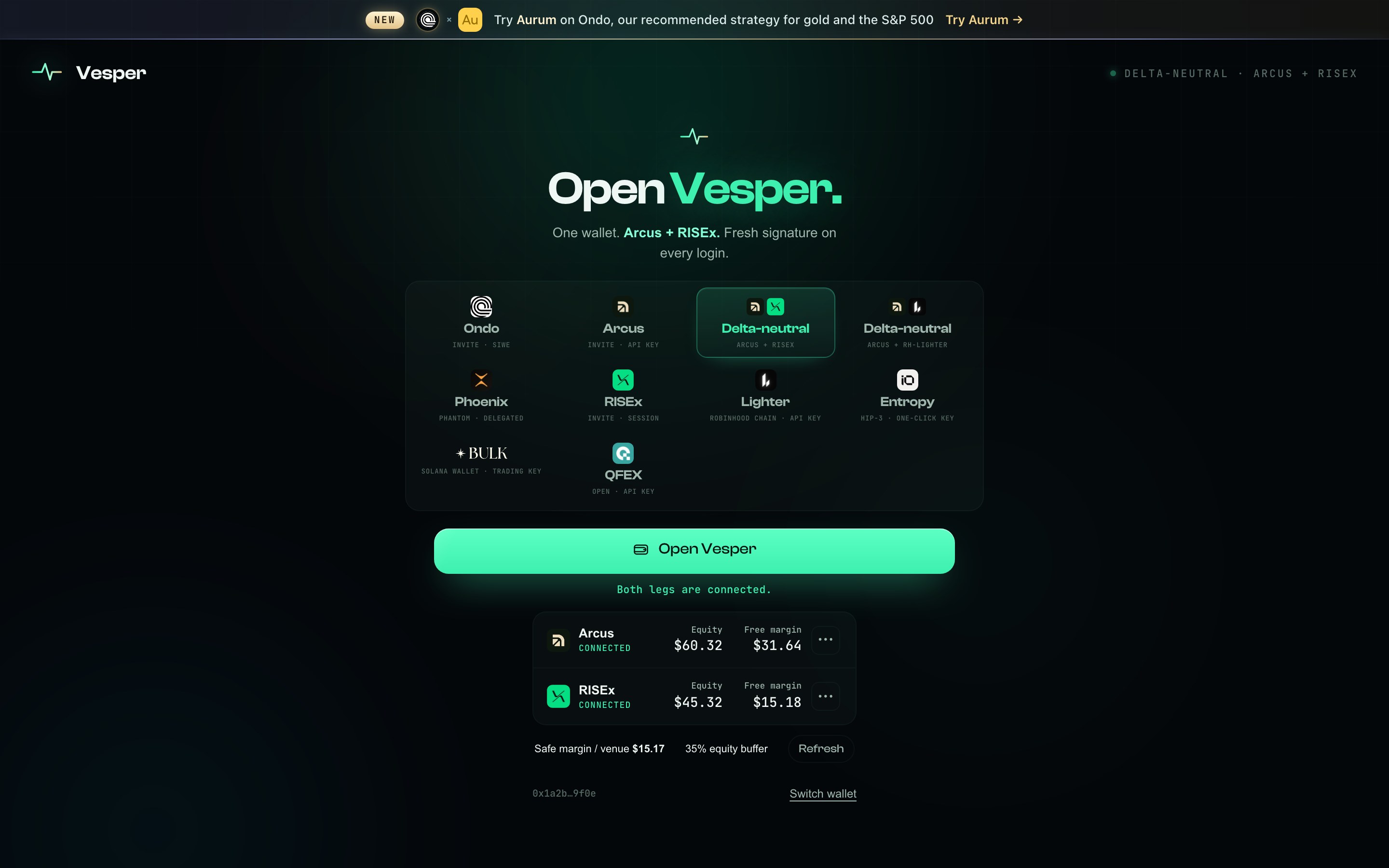
Both legs connected: equity and free margin on each venue, and the safe margin Vesper may use.
Four steps, nothing to calculate
Open Strategy & risk. The settings are laid out as four cards; each i explains its card in plain words.
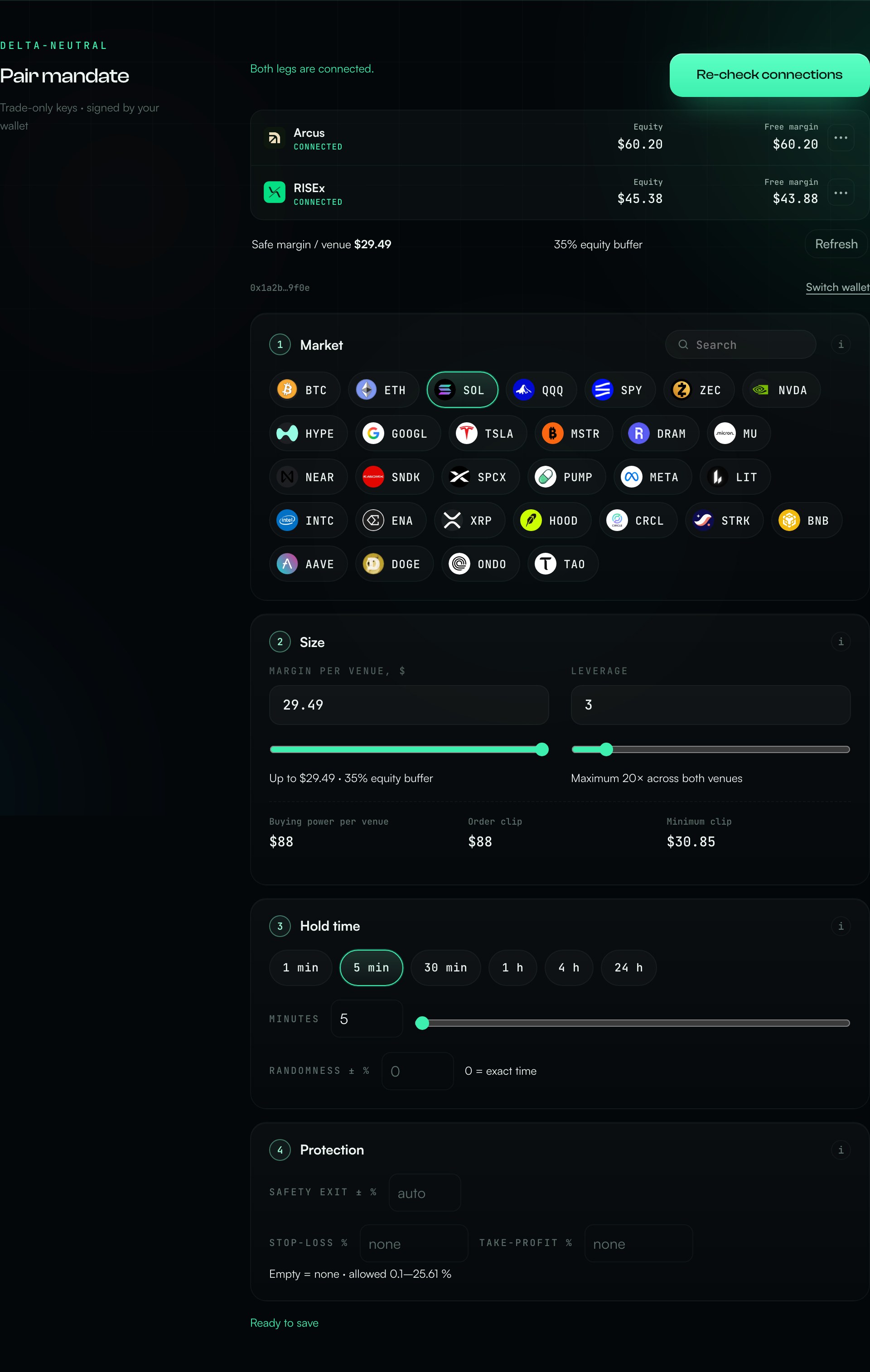
- 1 · Market
Pick the coin or stock. Type a ticker or a name in Search — “sol”, “nvidia”, “s&p”. Both venues trade the same market.
- 2 · Size
Margin per venue and leverage. Margin times leverage is the order size on each venue. Vesper will not let you go above the safe amount, and shows the order size underneath.
- 3 · Hold time
How long each round stays open: 1 minute to 24 hours. Randomness lets every round pick its own time around it (0 = exact).
- 4 · Protection
Safety exit: if the price moves this far from the entry, both legs close together (empty = automatic, by leverage). Stop-loss and take-profit are optional.
If a value does not fit, Save settings stays disabled and the line under the cards says exactly why — for example “Stop-loss must be from 0.1 to 25.61 % at 3× leverage”. Settings apply at your next Start; a running session keeps the settings it started with.
Press Start, approve once
Back on the dashboard, press Start Vesper and approve the request in your wallet. Vesper first checks that both venues are empty, then starts the first round. The status at the top tells you what it is doing — “Waiting for a good gap”, “Opening both legs”, “Holding”.
Vesper watches for sharp price moves before it opens a pair. When the entry guard is set to pause, a Market · Paused tile appears and no new pair opens until the market calms down. Pairs that are already open are not affected.
Everything on one screen
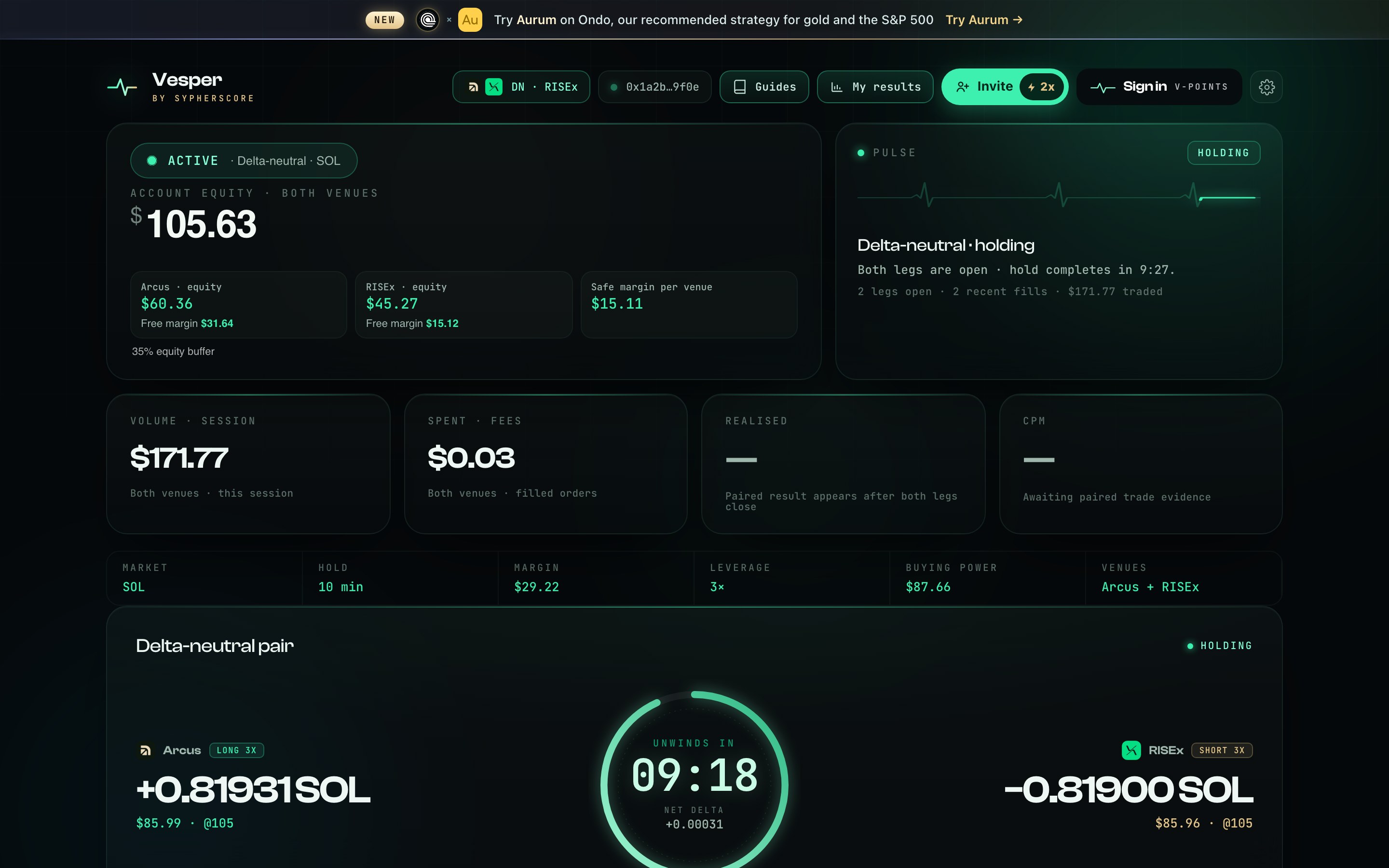
- Top cards
Volume, fees, realised result and CPM for this session. The result appears once the first round closes on both venues.
- The pair
Arcus on the left, RISEx on the right, with size, value and entry price. Net delta in the middle should stay near zero — that is the whole idea.
- The ring
Counts down the hold. +10 / +30 / +60 min keep this round open longer; the next round goes back to your normal hold.
- Balance & Auto-exit
Money on each venue, and the prices where the pair closes by itself.
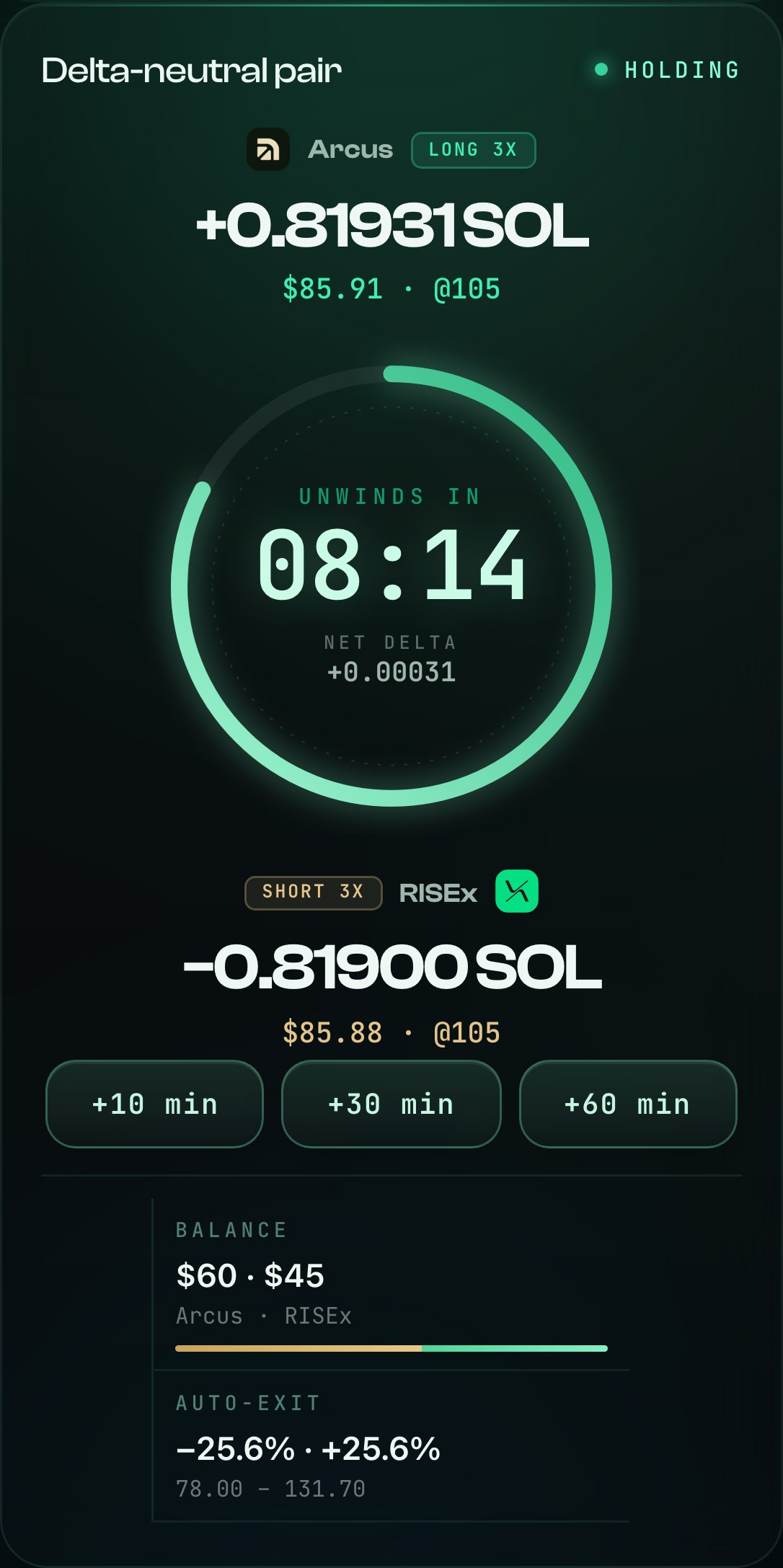
The same card on a phone: legs stack around the ring.
Stop closes both legs together
Press Stop Vesper and approve in your wallet. If no pair is open, Vesper simply cancels its order. If a pair is open, it closes both legs at once — it does not wait for a better gap. Wait for “Stopped — verified flat, no resting orders”: Vesper has checked both exchanges and nothing is left.
Do not leave until you see that line. If something cannot be confirmed, the dashboard says so in red and keeps the pair under control; press Stop again or refresh.
Every session in My results
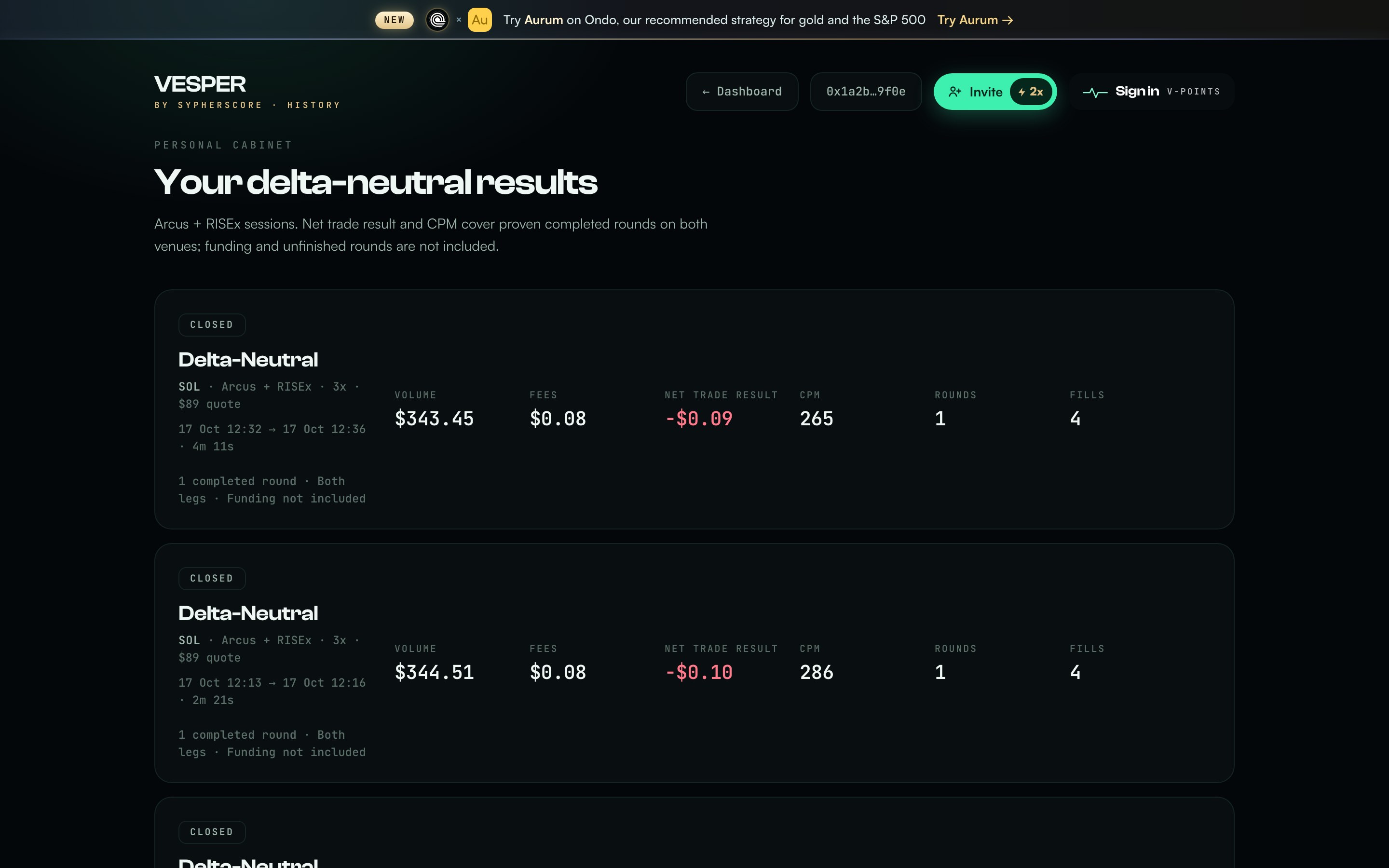
My results lists each delta-neutral session: volume, fees, net trade result, CPM, rounds and fills. Only rounds closed on both venues count. Funding is not included in this result.
Short answers
- How much do I need?
- Enough on each venue for the minimum order of your market after the 35% buffer. The Size card shows the minimum and stops you below it.
- Why is it waiting?
- It opens only when the market is calm and the spread is normal; it does not wait for a price gap between the venues. The safety checks stay on the whole time.
- Why did the round end slightly down?
- The instant hedge on RISEx pays a taker fee on every fill. Short holds and small sizes make that cost more visible; the gap and funding are what pay it back.
- Can it withdraw my funds?
- No. The trading keys can place and cancel orders only.
- Can I trade the same market myself?
- Use a different market for your own trades. Vesper will not start a market that another of your strategies already uses.
What Delta-neutral cannot do
Remove all risk. Two exchanges, partial fills and sharp moves can leave a small gap between the legs for a moment. Vesper closes it at once, but it is not zero.
Promise a return. Fees are certain, the gap and funding are not. Some rounds and sessions end down.
Move your funds. The keys have no way to withdraw.
New to market making? Start with the guide library.