
A market maker, not a price prediction
Cypher places limit orders to buy and sell on Arcus. When another trader fills a quote, your account acquires or reduces a position. The engine updates its quotes as the book changes and manages the resulting inventory.
It builds on Hermes execution, adding price improvement where the spread allows and a short-term gate on exposure-increasing orders. Buying into a falling market or selling into a rising one can be expensive even when the exchange charges no maker fee. The gate is designed to avoid some of those entries.
Cypher runs on the server. You do not need to keep your browser or computer on. It is not a hedged, delta-neutral pair: while a position is open, your account is exposed to price movement.
The objective is better cost per unit of turnover. More fills are not automatically better. A quieter session can be doing exactly what the strategy intends.
Connect the account you want to trade
Before you begin
- You need an Arcus account with available trading collateral. A balance in your wallet alone is not the same as collateral deposited on the exchange.
- Use the wallet that owns that account. If Arcus or the connection screen requires an invite or account activation, complete that step first.
- Do not run another bot or place manual trades on the same account while Cypher is managing it. Shared positions and collateral make session control and accounting harder to interpret.
- Never share your seed phrase, wallet private key or API secret in chat, screenshots or a support message.
Wallet connection
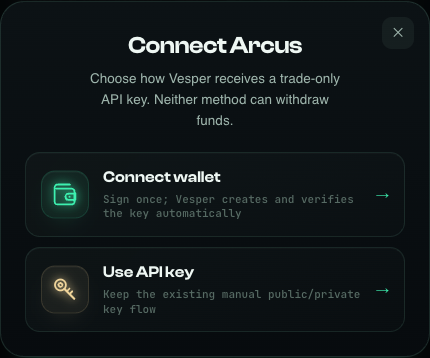
- Open the public Arcus connection page. Check the domain is sypherscore.com and the selected venue is Arcus.
- Choose Connect wallet, then the wallet connection method. Select your wallet in the picker or use its WalletConnect flow.
- Read and approve the requested connection and trade-authorization messages in your wallet. Reject any unexpected transfer or withdrawal request.
- Wait for the site to confirm that trading access is ready, then continue to settings. A connected wallet address alone does not prove that the trading key is ready.
Already have an Arcus API key?
Use the manual API-key option on the same connection screen and follow its fields. Use the key for the account you intend to trade, with trading permissions and no withdrawal permission. Paste it only into the site’s connection form. Do not put it into a URL or send it to support.
Non-custodial means the funds remain in your exchange account. A trade-only key still authorizes real orders, which can lose money. It does not make trading risk-free.
Venue, market, mode, size
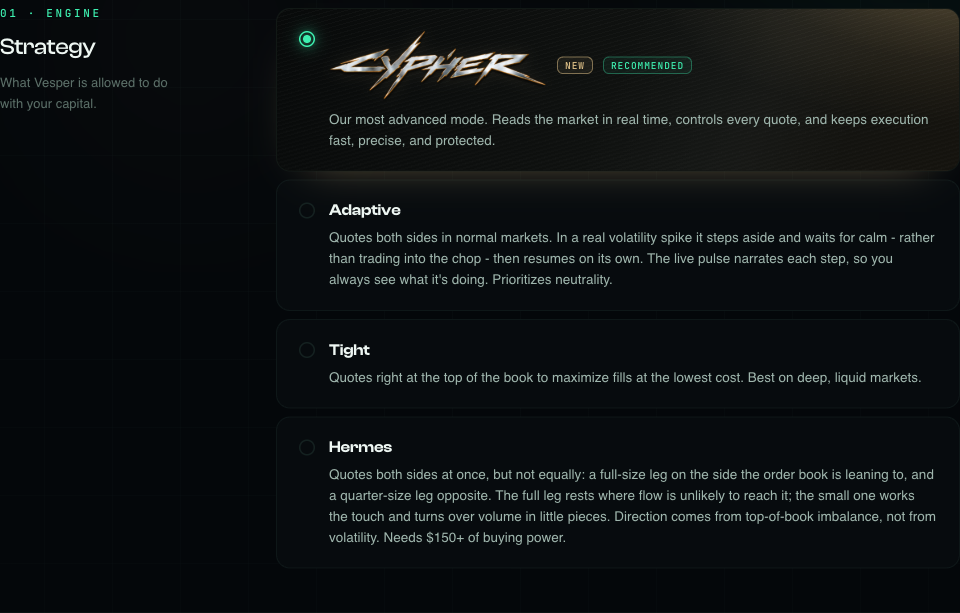
- In settings, confirm Arcus. Choose the market you intend to trade. BTC is the market used for the release validation; do not assume identical economics on stocks, metals or other books.
- Select Cypher, the first strategy card marked New and Recommended. Check the actual selection, especially if you previously saved another mode.
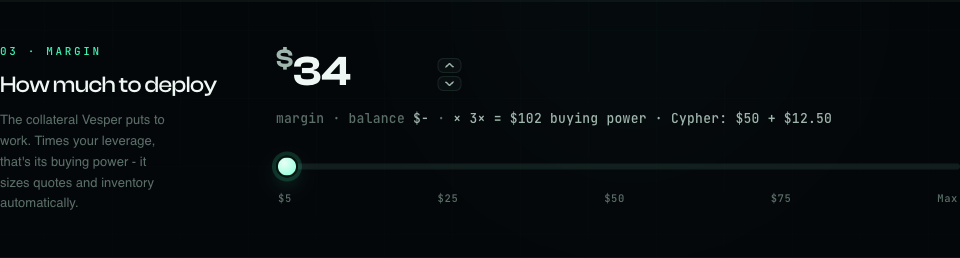
- Set your margin allocation and leverage. Review the resulting quote size and maximum inventory shown by the panel before starting.
- Press Save settings. The page confirms the save and takes you to the dashboard. Saving settings does not start trading.
- On the dashboard, verify the venue, market and mode again. Press Start and approve the requested authorization. Check the resulting live state rather than assuming the click succeeded.
- Margin
- The collateral allocation used to derive the session’s buying power. It is not a maximum-loss limit or a promise that the rest of a cross-margin account is isolated.
- Leverage
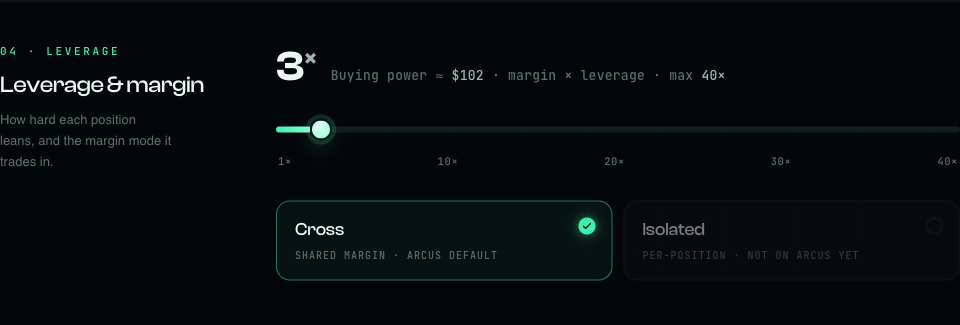
- Multiplies the notional exposure available for a given margin allocation. More leverage does not make CPM cheaper by itself. It can increase liquidation risk.
- Buying power
- Approximately margin × leverage. For illustration, $30 at 5× corresponds to $150 of buying power, not $150 of deposited funds.
- Quote size
- The notional value of an order, not the amount you will necessarily lose. The illustrated release UI derives the larger quote from buying power in $50 steps, normally within $50–$150. Available margin, position and exchange rules can reduce actual order sizes.
- Maximum inventory
- The configured ceiling for net position exposure. It limits size, not dollar loss, execution slippage or the time needed to exit.
A real settings example
The screenshots below show the public settings page before connecting an account: $34 margin at 3×, giving approximately $102 buying power. The preview shows a $50 larger quote and a $12.50 opposite quote. These are real UI values, not a sizing recommendation or proof that a funded account passed admission.
No user-configurable stop-loss or holding timer is shown for Cypher. The volatility checkbox is also hidden in this mode. Hidden controls do not mean that all internal checks or previously saved guard settings have been deleted. Do not assume an automatic exit at a dollar loss or after a fixed time.
Use a size you can monitor and afford to lose. Follow the live panel’s validation if a setting is unavailable; do not raise leverage simply to force a larger order or bypass an insufficient-margin warning.
Entry gates are not a freeze on exits
Fast execution, with maker boundaries
Cypher uses a WebSocket trading path for order placement and modification. Quotes can change quickly without waiting for the page to refresh. Actual speed depends on the exchange, network and account state; there is no guaranteed fill time.
On a sufficiently wide book, it can improve an entry price inside the spread. A reducing exit can improve its price by a tick where space permits. The quote still respects the maker boundary: getting priority is not permission to cross the opposite quote.
The short-term entry gate
The release preset observes short-term price movement over a three-second window. During startup it first warms up that history. If the move is adverse to a new entry, the gate blocks the side that would add that exposure.
- During a downward move, adding a long can be blocked.
- During an upward move, adding a short can be blocked.
- An order that reduces an existing position is not blocked by this entry gate.
This is a local, short-horizon rule, not a prediction of the next candle. A large red candle on your chart does not mean that every order must disappear: a sell may be reducing an existing long, and a different side may still be permitted.
Holding and broader market guards
The broader volatility guard is separate from the short-term entry gate. When enabled in the saved session configuration, it can hold back new exposure during an unfavorable regime while the engine works down inventory. The hidden UI checkbox does not rewrite older saved choices, so two accounts can show different phases.
Holding is not the same as Stopped. The session remains active and may resume quoting when its conditions allow. Gates cannot prevent every adverse fill, reverse an already executed trade or guarantee an immediate exit.
Know what each number is telling you
- Status & Pulse
- Shows whether the engine is making markets, holding, stopping or waiting on a connection. Confirm the header says Arcus and cypher. An Active label alone is not proof of recent fills.
- Account equity
- The account-level value, not just closed profit from this session. It can move with an open position and other account events.
- Volume
- Executed notional attributed to the session. An opening fill and its closing fill both contribute. An unfilled, canceled or rejected quote is not traded volume.
- Spent · Fees
- Recorded trading fees. Zero fees do not mean zero trading cost: losses from the entry/exit prices still matter.
- Realised
- The result recognized from completed executions. Read the card’s fee note: if fees are already included, subtracting them again double-counts the cost.
- CPM
- Dollar cost normalized to $1 million of traded volume. While the session is live, equity and unrealised exposure can affect the displayed cost; see the explanation below.
- Open positions
- Current net positions, not the order book or trade history. It may be empty between fills even while quotes are resting on the exchange.
- Activity
- Recent session events and fills. It is a recent-event feed, not an exhaustive archive of every quote modification. Use session history and the exchange record for reconciliation.
- My results / History
- Session records, including the current open session and completed runs. Compare the same session, start time and market; an account-wide or all-time number is a different scope.
A fill is one execution, possibly a partial execution. It is not necessarily a complete buy-and-sell round trip. Fast fills can occur between two dashboard refreshes.
Maker fees are not the whole cost.
CPM means cost per million of turnover. It scales the session’s net cost to a common volume so runs of different sizes can be compared. It is not a fee charged by Vesper and not a forecast of what the next million will cost.
CPM = net session cost ÷ executed volume × 1,000,000
For a completed session, a net loss is a positive cost. A net gain produces a negative cost. With no executed volume, CPM is not meaningful.
Illustration only, not a measured return or target. $1.20 ÷ $10,000 × 1,000,000 = $120.
Why can CPM rise if maker fees are zero?
- Adverse selection: a resting buy fills just before the market falls, or a resting sell fills just before it rises.
- Inventory: the price moves against an open position. The live equity-based CPM can change before that position is closed.
- Forced exits: Stop or emergency cleanup can use a taker execution, which may pay a fee and cross the spread.
- A small denominator: a few cents of loss divided by very little volume can show a large CPM. Early-session readings are especially unstable.
Arcus maker executions in the release checks had zero maker fees. This does not promise zero fees on every execution. Taker exits have different economics; exchange fee schedules and account conditions can change. Check the actual fill record. Funding and other account cash flows can also affect equity.
How to compare sessions fairly
Compare the same market and similar size over meaningful volume, preferably after the position is flat and the session is finalized. During a run, the live CPM may use the change in session equity, whereas Realised reflects booked executions. After Stop, allow final fills to settle into history. Avoid deposits, withdrawals or unrelated manual trades during a measurement window: they make an equity comparison harder to interpret.
Lower CPM is better for cost efficiency, but it is not the only measure. Check actual dollar P&L, volume, exposure, maker share and time spent trading. No single CPM value is guaranteed in calm or volatile markets.
Finish the session, not just the browser tab
- Use the dashboard’s Pause Vesper / Stop control and complete any requested authorization. This starts the session shutdown and cleanup workflow.
- Wait for the stopped state. A button click or an HTTP acknowledgment alone does not prove that exchange cleanup has finished.
- Check Arcus for remaining positions and open orders. Confirm the session appears as completed in History before switching strategies or reusing the account.
Stop cancels managed quotes and attempts to close the managed position. It is not a promise to wait for a profitable maker exit. Cleanup may use a taker order and realize a loss. The final result can change while the last exchange fills arrive.
Closing the tab
Closing or refreshing the browser does not stop server-side trading. Reopen the dashboard with the same wallet to view the session. Disconnecting the wallet from the page is not a substitute for Stop.
Server restart
Running sessions are designed to recover from persisted state and reconcile with the exchange before continuing. A confirmed user Stop is persisted so a restart does not intentionally start that session again. Recovery still depends on working exchange access and infrastructure; verify the state if there has been an outage.
RECONNECTING or unknown status
The page may keep the last confirmed numbers while it cannot reach the engine. Treat those numbers as stale, not as proof the position is flat. Do not repeatedly press Start or launch another strategy on the same account. Check the exchange and contact support if fresh state does not return.
If cleanup fails, do not assume you are flat. Inspect Arcus directly. If immediate manual intervention is necessary, first prevent the bot from continuing to trade, for example by revoking its trading key on Arcus. Then manage remaining orders and exposure on the exchange. Revoking a key by itself does not cancel existing orders or close a position.
Common questions
Why do I see rejected orders or modifyOrder rejects?
A quote may have filled, been canceled or become invalid before a modification reached the exchange. A post-only order can also be rejected because the book moved and it would now take liquidity. These are possible explanations, not a diagnosis of every reject.
An isolated reject followed by normal reconciliation and fresh orders can be routine. Repeated rejects with no useful progress, incorrect size, missing exits or rising exposure need attention. Check the exact exchange message. Do not dismiss authentication, margin or rate-limit failures as merely visual.
The market is falling. Why is Cypher still placing orders?
A reducing exit should remain available. The short-term gate is side-specific, and the broader guard depends on the saved configuration. Check order side, current position and Pulse. A filter reduces some exposure; it cannot detect every shock or guarantee that the next fill is favorable.
Why is the session Holding with no fills?
Startup warmup, a market guard, lack of permitted opportunities or account constraints can pause new entries. Read the status explanation. More frequent Start clicks do not create a better market. If it stays unexplained or the data stops updating, check exchange connectivity and contact support.
Activity or Open positions is empty. Is trading broken?
Open positions can correctly be empty when the account is flat between fills. Activity is a separate recent-event feed. If the fill count is growing but Activity remains empty after reconnecting, or Arcus shows a position missing from the dashboard, report the discrepancy. An empty panel is not independent proof of no exposure.
Can a small residual position block the bot?
The release preset documented on 12 September used a $15 notional dust tolerance for operational position handling, intended to keep tiny residuals from stalling the quote workflow. That does not erase the position: actual residual exposure still counts in risk checks. Exchange minimums and startup/cleanup checks also apply. Do not assume every balance below $15 is ignored, or manually add trades to make dust larger.
Do I need to buy or configure proxies?
No manual proxy setup is required in the user flow. Cypher’s infrastructure assigns account routing, including a separate WebSocket route. This does not remove the exchange’s limits or guarantee that a connection can never fail.
Why did Start report capacity or insufficient margin?
A release capacity limit or an account check can prevent a session from being admitted. Do not assume another mode started instead. Read the error, verify the displayed mode and retry only after the condition is resolved. Capacity is bounded; availability is not a promise of unlimited simultaneous users.
WalletConnect could not be loaded. What should I do?
Confirm you are on the public Arcus connection page, reload once and check whether a content blocker is blocking the wallet connection bundle. Try a supported wallet browser or the manual API-key method if you already have a valid trade-only key. Never paste your seed phrase into any website to fix a connection error.
How do I change mode, market or wallet?
Stop the current session and verify cleanup first. Then return to settings or the connection screen, select the intended account and review the next session before Start. Do not overlap strategies on the same Arcus account.
What should I send to support?
Send the venue, market, approximate time and timezone, session start time, visible error text and a screenshot with secrets hidden. A public wallet address can help identify a session, but use the official support channel if you do not want to post it publicly. Never send an API key, private key, seed phrase or a URL containing an authentication token.
A final check is worth the pause
- I am on the official site, using the intended Arcus account and market.
- The selected mode is Cypher; I have checked margin, leverage, quote size and inventory.
- I understand that the mode can hold directional exposure, lose money and be liquidated.
- I am not relying on a hidden stop-loss, holding timer or a guaranteed CPM.
- No other bot or manual strategy is sharing this account while the session runs.
- I know where to find Stop and how to verify positions and orders directly on Arcus.
Cypher is trading software, not a guaranteed return. Network failures, exchange outages, gaps, slippage and unexpected fills can occur. Position limits and entry gates reduce specific risks; they do not remove them.
Argent and Cypher: reading inventory and exits
Ready to set up Cypher?
Connect Arcus, review your settings and keep the dashboard open for your first session.
Open Arcus setup →Already connected? Open your dashboard.