Two venues. One wallet. Net delta zero.
Delta-neutral holds two equal and opposite positions, one on TxFlow and one on Arcus, so price moves mostly cancel out. Vesper runs the pair for you: it opens both sides, holds them for the time you choose and closes them, round after round, until you press Stop.
Both venues, one wallet
Sign in once. Vesper connects TxFlow and Arcus to the same wallet, and the dashboard shows both balances side by side.
Keys that can only trade
The keys you create can place and cancel orders. They cannot withdraw. Your money stays in your own accounts.
Stocks, indices and commodities
Pick from the markets both venues trade, from one list, with search.
Runs while you are away
The session runs on our servers until you press Stop, even with the tab closed.
USDC on TxFlow and on Arcus
The mode trades from two accounts at once, so each one needs money of its own: USDC on TxFlow and USDC on Arcus, from the same wallet. Keep the two amounts close. Each side needs margin of its own.
- TxFlow
Open app.txflow.com and press Deposit.
- Arcus
Open app.arcus.xyz and press Deposit. No Arcus account yet? Register through our invite link app.arcus.xyz/ref/SYPHER with the same wallet.
- How much
At least $10 of free margin on each venue, more for bigger pairs; $50–200 on each is a comfortable start. All your pairs together use at most 65% of each balance, so 35% always stays free for safety.
Four signatures, nothing to copy
Open the connect page, tap Delta-neutral · TxFlow + Arcus and press Connect wallet. MetaMask, Rabby, OKX Wallet and other EVM wallets work. The same button then walks you through three steps:
- 1 · Sign in
One signature proves the wallet is yours. No funds move.
- 2 · Connect Arcus
One signature creates a trade-only Arcus key. If your wallet asks to switch to the Arcus network (4663), approve it.
- 3 · Connect TxFlow
Two signatures: approve the Vesper fee of at most 0.005%, then create a trade-only TxFlow key.
When both rows say connected, press Open Vesper. The keys can place and cancel orders. They cannot withdraw your funds.
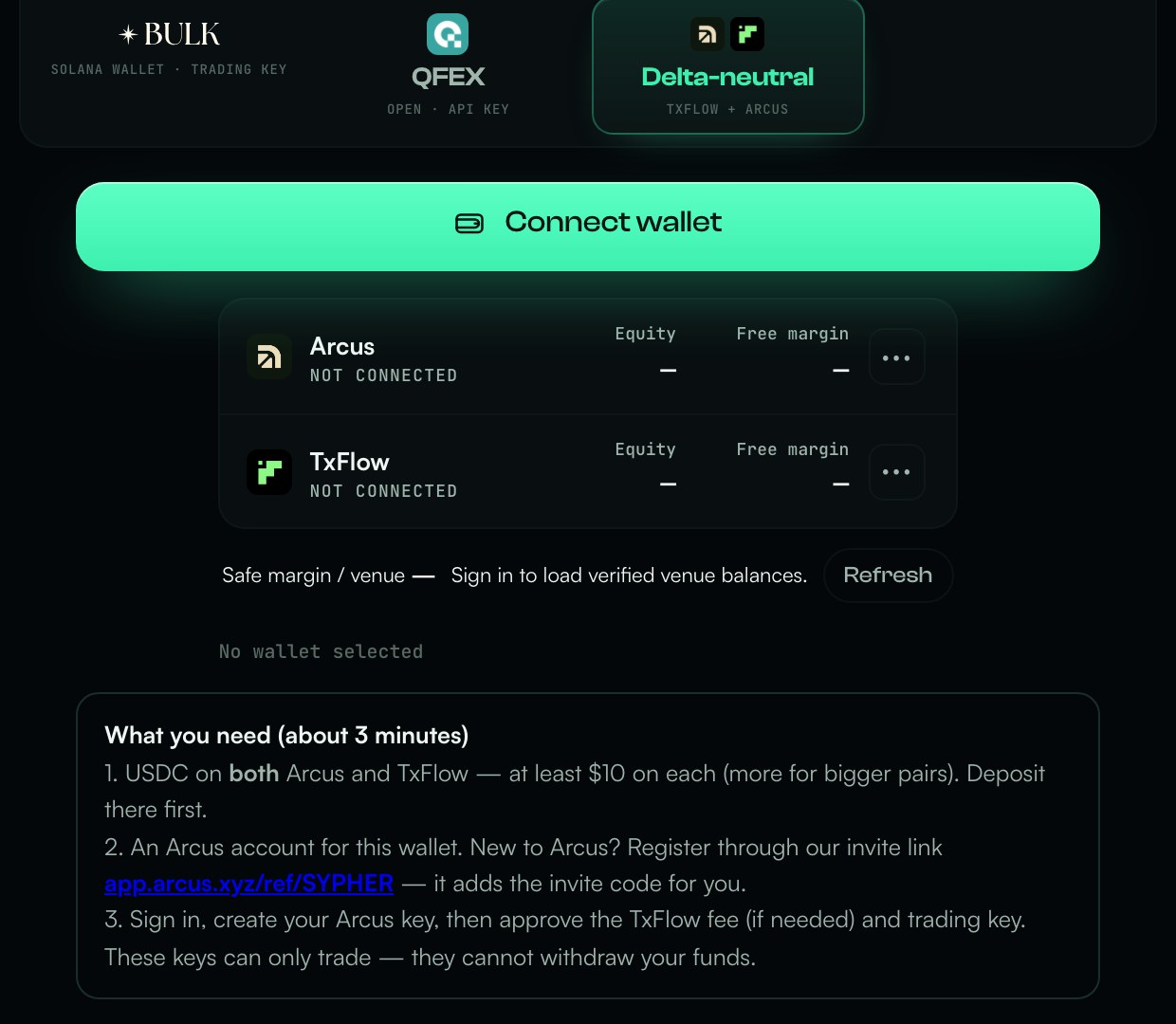
The Delta-neutral · TxFlow + Arcus tile. Both venues appear underneath once they are connected.
Rejected a signature by mistake? Nothing was changed. Press the button again.
One window, five choices
On the dashboard press Set up a pair. Everything for the pair is in one window:
- Market
Stocks such as NVDA, TSLA, AAPL or META, indices and ETFs such as SPY and QQQ, and commodities such as GLD, SLV and USO. Search works too. Both venues trade every market in the list.
- Margin, each venue
The dollars behind the pair on each venue. Underneath you see how much is free right now.
- Leverage
Margin × leverage is the position on each venue. Every market has its own limit, and Vesper lowers the value if it is too high.
- Hold
How long each round stays open, from 1 to 1,440 minutes. Then the pair closes and the next round begins.
- Protection & timing
Optional: stop-loss, take-profit, safety exit and hold randomness, for this pair only. Left off, Vesper still closes both sides well before liquidation. As a backup, TxFlow also holds stop orders on the venue itself while a round is being held.
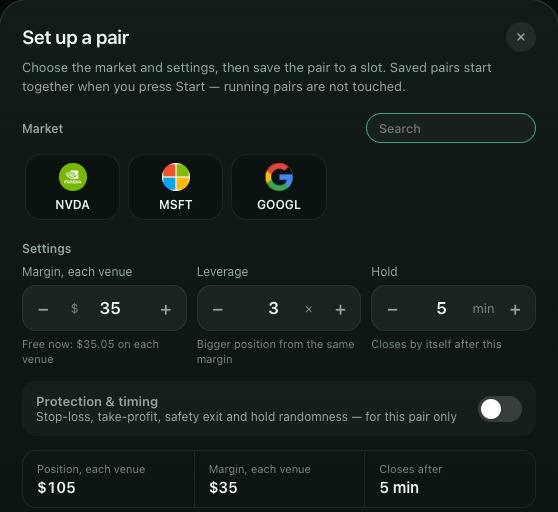
The summary at the bottom shows the position on each venue before you save. Then press Save.
The pair goes to a slot. You can set up more pairs the same way; the dashboard shows how many slots are free.
A calm first sessionNot sure where to start? Try $25–50 of margin on each venue, 3–5× leverage and a 30–60 minute hold, with the default protection. Size up once you have seen a few rounds.
Press Start, confirm in your wallet
Press Start below your pairs and confirm in your wallet, one signature per pair. You will see Start accepted — Vesper is checking both venues. From then on each pair card shows what is happening: opening, holding with a timer, closing.
The session runs on our servers. You can close the tab: it keeps going, round after round, until you press Stop.
Everything on one screen

- Volume
What this session has traded, across all your pairs.
- Fees
What the filled orders cost.
- Realised
The result of closed rounds, price and funding together. Fees are shown separately.
- CPM
Net cost per $1M traded. Lower is better. It settles once the session has some volume.
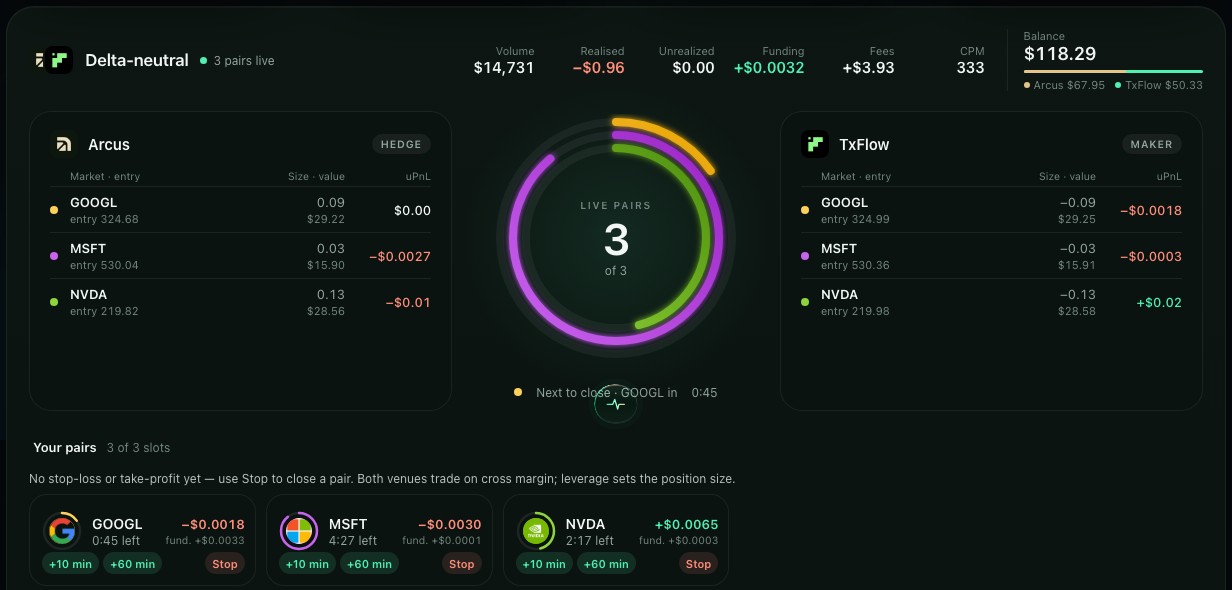
Arcus and TxFlow side by side, the ring with the time to the next close, and a slot for every pair with its own timer. +10 min / +60 min keep that round open longer, Stop closes that pair.
Screens from a real session on our test wallet. Values are an example, not a forecast.
Stop, then wait for Stopped
Press Stop on a pair, or Stop all, and confirm in your wallet. Vesper closes both sides with patient orders, so it takes a few minutes: usually 3–12, on a quiet market up to 15–20. Both sides stay matched the whole time.
Wait until the pair shows Stopped before you leave. Until then its margin stays reserved, so a new pair on the same money can start only after that.
Closing the tab or disconnecting your wallet is not Stop. If something looks stuck, check both venues directly and write to us.
Before you start
- How much do I need?
- At least $10 of free margin on each venue, more for bigger pairs. Vesper keeps 35% of each balance free, and the Set up window shows what is free right now.
- It says my Arcus account has no USDC yet.
- Deposit USDC on Arcus (app.arcus.xyz → Deposit), wait for it to arrive, then press Refresh balances. The same works for TxFlow (app.txflow.com → Deposit).
- “Not enough margin” when I save or start.
- Your pairs need more than is free on one of the venues. Lower the margin, remove a pair, or deposit more on the venue with less free margin.
- I don’t have an Arcus account.
- Register through app.arcus.xyz/ref/SYPHER with the same wallet, then come back and press Connect Arcus again.
- Why is my pair still closing after Stop?
- Vesper closes both sides with patient orders to keep costs down. It usually takes a few minutes, and both sides stay matched until they are closed.
- What does it cost?
- Venue fees, the Vesper fee of at most 0.005% of TxFlow volume, and the small price difference between the two venues. Funding can add to the result or take from it. The dashboard sums it all up as CPM, the cost per $1M traded.
- What if I close one side myself?
- Vesper closes the other side for you, so you are not left with one side open. Vesper never re-opens a side you closed yourself.
- “… allows up to N× leverage”.
- Each market has its own leverage limit. Lower the leverage, or let Vesper lower it for you.
- Can Vesper withdraw my funds?
- No. The keys can place and cancel orders only. Real orders can still lose money.
What delta-neutral cannot do
Remove all risk. The two sides fill on two venues a fraction of a second apart, sharp moves happen, and each venue has its own margin. Vesper closes both sides well before liquidation, at a loss within your settings, but the risk is not zero.
Trade fast at every hour. Outside the main US session stock markets are thin, so entries and exits take longer.
Promise a return. Fees are certain; the rest is not. Some rounds and sessions end down.
Move your funds. The keys have no way to withdraw.

TxFlow is live on Vesper. Connect your wallet and start your first delta-neutral pair.
Other Vesper guides
All guides · How market making works · About Vesper · Ask the community · Discord