EXITE has its own setup workflow
Read the selected mode’s guide and review the actual wallet authorization before signing. Venue fees, funding and trading risks depend on your account and market.
Three things you need
A supported EVM wallet. Use a wallet supported by the current connection screen. Inspect every authorization; never enter a seed phrase or share your private key.
An eligible Hyperliquid account. Check access, activation and the current collateral requirements for the selected Entropy market before funding. Do not assume every account mode is supported by your Vesper connection.
Available margin on the Entropy balance. Requirements depend on clip size, leverage, open inventory and venue rules. A balance shown in a screenshot is not a recommended deposit or proof that the current settings fit your account.
Check the account mode and available margin
Hyperliquid’s Standard mode separates balances; Unified combines eligible balances. Review the official account modes. A zero in one balance view is not a reason to transfer funds or change modes automatically.
The following is the documented Standard-mode IO transfer example, not a universal instruction. Confirm the active account, collateral, market identifier and Vesper compatibility first. If your interface differs, stop and verify the route rather than reproducing an old screenshot.
1. Inspect Portfolio / Transfer. In the separate-balance example, USDC can need the Perps to Spot route first. Check source, destination, amount and any fees before approving.
2. Find the intended ANTH market on Entropy/IO in Trade and check its full identifier. The historical interface exposed the IO route after opening this market; current labels can differ.
3. If the displayed route matches Spot to Perps (IO) for that account and asset, review it before transferring. Afterwards, reconcile the venue’s available margin with Vesper. If they disagree, investigate instead of sending another transfer.
Want to support the project? Open Entropy through entropy.io/?r=vesper or add the code vesper under Referrals. It is optional; review current referral terms. Venue rules and trading risks still apply.
Review the trading and fee approvals
Open sypherscore.com/vesper/connect, switch the venue to Entropy and connect your wallet. Review the ApproveAgent trading authorization before signing. Check all permissions shown in the actual request before signing.
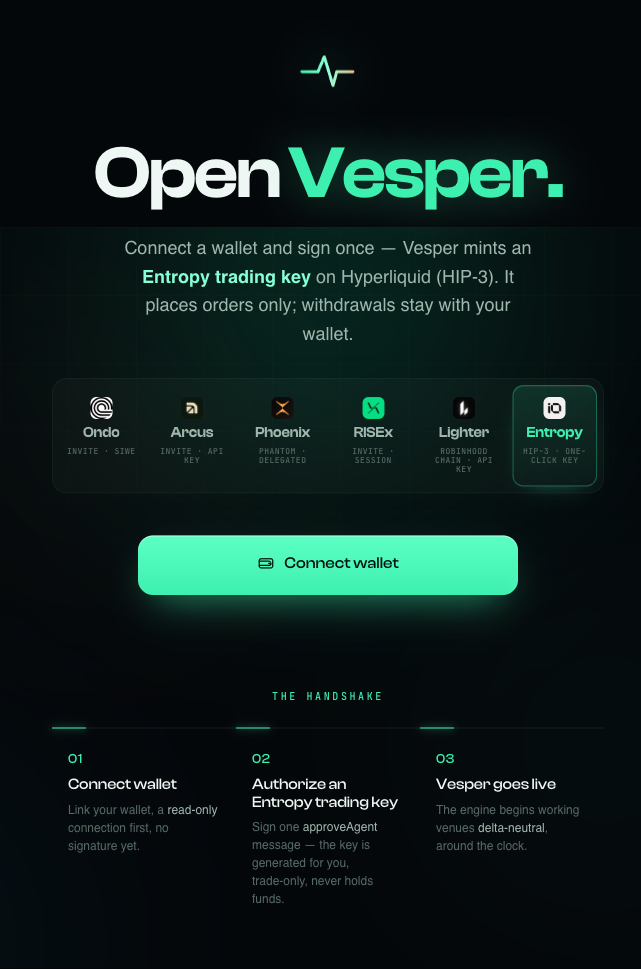
Historical connect screen with Entropy selected. Check current approval status; registering an agent does not prove that quoting has started.
If authorization is rejected, read the actual venue error and review agent limits, expiry and account activation in Hyperliquid’s API settings. Do not revoke an agent used by another active application just to clear an error.
Match the clip to your balance
The clip is dollars per order. As an arithmetic example, $350 notional divided by 3× leverage is about $117 initial margin before other requirements. This is not a recommended clip or leverage: existing positions, orders, fees and the venue’s margin rules also matter.
Check available margin, position limits and loss limits before Start. If orders are rejected, inspect the reason; do not automatically add funds or increase leverage.
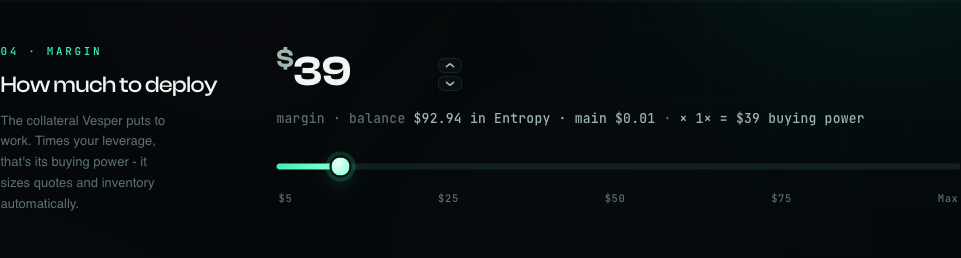
Margin and clip in Strategy & risk. Historical illustration; verify the current settings.
Start, then verify the session state
After reviewing the selected mode, sign Start and monitor status, waiting reasons and any order errors. EXITE can wait for entry conditions. The engine runs server-side: closing the browser is not a Stop request or evidence that orders are cancelled.
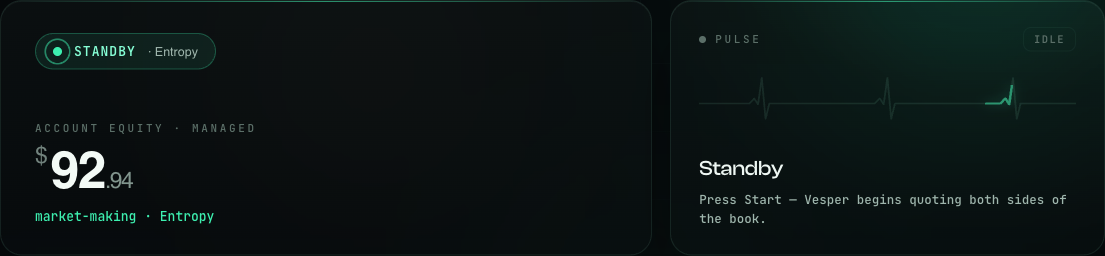
Historical dashboard: equity, status and the Start control. Read current values and timestamps, not the example balance.
Reading the dashboard
- Live status
Read status together with timestamps, orders and positions. A waiting label does not independently prove that the account is flat or the session is healthy.
- Used versus available
Margin used, available margin and account equity are different values. A zero can reflect no margin usage, a stale read or the wrong account view. Reconcile positions and balances with the venue before drawing a conclusion.
- Totals
Read filled turnover, realised P&L, fees and funding together. CPM is cost per $1M of filled turnover under the stated accounting convention, not a profit guarantee or an open-inventory risk measure.
- Stop
A signed Stop requests cancellation and flattening. Wait for terminal status, then independently verify zero positions and no open orders on every affected market, and review History. Interruptions can delay cleanup; exits can incur fees and losses. If state is unknown or cleanup fails, do not start another session. Check the venue and contact support. See risk controls.
Permissions are not a guarantee of safety
Trading authorization. Review its actual scope and do not grant withdrawal access. Trading can lose money even while funds remain in your account.
Protect wallet secrets. Never enter a seed phrase or send a private wallet key. A signature can grant substantial permissions; inspect its contents, account and destination.
Disconnect and revoke. Removing a saved key and revoking venue authorization are different actions. Neither is evidence that a position is flat or orders are cancelled. Check the session and venue state before treating a run as finished.
Other Vesper guides
All guides · How market making works · About Vesper · Ask the community · Discord