What the bot is actually doing
It is not guessing which way the price will go. It places a buy a little under the market and a sell a little over it, seeking to capture the spread when both sides execute. One-sided fills leave inventory exposed to price movements; turnover alone is not income.
CPM is cost per million dollars traded: net session cost divided by executed turnover, multiplied by 1,000,000. Fees are one component, not a floor: realised gains can offset them, losses can increase cost. Include applicable funding and rebates consistently. Compare the same time window and turnover convention, and inspect open exposure separately. Read the CPM methodology and current costs.
Sniper changes when it quotes and which markets it selects. This aims to manage execution and inventory costs; it does not prove a lower CPM than another mode. The Argent guide explains single-market setup and execution.
Ten hours in, fourteen hours out
Spreads, depth and price moves change through the day. Sniper uses scheduled quoting windows instead of staying in the book continuously. The schedule below describes the September 15 release; check the current UTC schedule in the dashboard before starting. It is not a forecast that these hours will have the lowest cost in your next session.
- Weekdays
Two windows: 03:00–10:00 and 21:00–24:00 UTC. Everything between is skipped on purpose.
- Weekends
Quoting runs around the clock. With the US session closed, the weekend schedule differs. That does not imply uniform liquidity or costs. It winds down again late on Sunday.
- Before each close
The documented release stops new inventory twelve minutes before the boundary, then requests cancellation and exits. Verify all markets on the venue; latency, liquidity and faults can delay completion.
- While asleep
The session stays alive. Your counters keep running, and the dashboard prints the time of the next window.
This is the trade-off to understand before you start: fewer hours in the book limits the available quoting time. Actual turnover and cost depend on fills, not just the clock. Compare completed sessions before attributing a cost difference to the schedule.
Two markets, picked at every window
In the documented release, Sniper has no manual market picker. When a window opens it scores four Ondo markets — gold (XAU), silver (XAG), the S&P 500 (US500) and the Nasdaq 100 (US100) — and keeps the best two, then splits your margin between them and quotes both at once.
- Live spread
How wide the book is right now. A market whose spread has blown out past 12 basis points is dropped from the running entirely.
- Yesterday's real cost
What each market actually cost per fill over the last 24 hours, computed from venue fills rather than from an opinion. It refreshes every half hour, so “silver is cheap today” is something the bot can notice by itself.
- A grouping guard
The documented selection pairs one metal with one index, excluding two metals or two indices. This grouping is not proof of statistical independence: correlations change and both positions can lose together.
These four markets form this mode's selection set, not a ranking of every market on Ondo. Depth and costs change. A prior cost difference between gold and an index is not enough to predict which market will perform better in the next window.
Selections can differ when their inputs or evaluation times differ. Check the actual markets shown in your session; an unexpected selection should be investigated, not assumed correct.
Check the account and invitation
Open the existing Ondo invite with code 867C4M. Confirm current access rules and account compatibility before registration or funding. Do not assume an existing account needs replacement or that a referral can be changed.
For account setup, read the Ondo guide and check current instructions on the venue. This document is not a live eligibility check.
Connect and inspect permissions
Open the connect page, select Ondo and inspect the wallet authorization. Grant only the required trading permissions; check the venue's current scope, expiry and revocation controls. A key without withdrawal permission can still submit losing trades. Never share a key or enter a seed phrase on the site.
Sniper, and the market picker disappears
Go to Settings / Strategy and choose Sniper. In the pictured release, market selection is automatic and the stop-loss and run-limit switches default to off. Review the current settings explicitly before Start; screenshots are not confirmation of your account's limits.

The card to look for. The Prime hours tag is the clock behaviour.
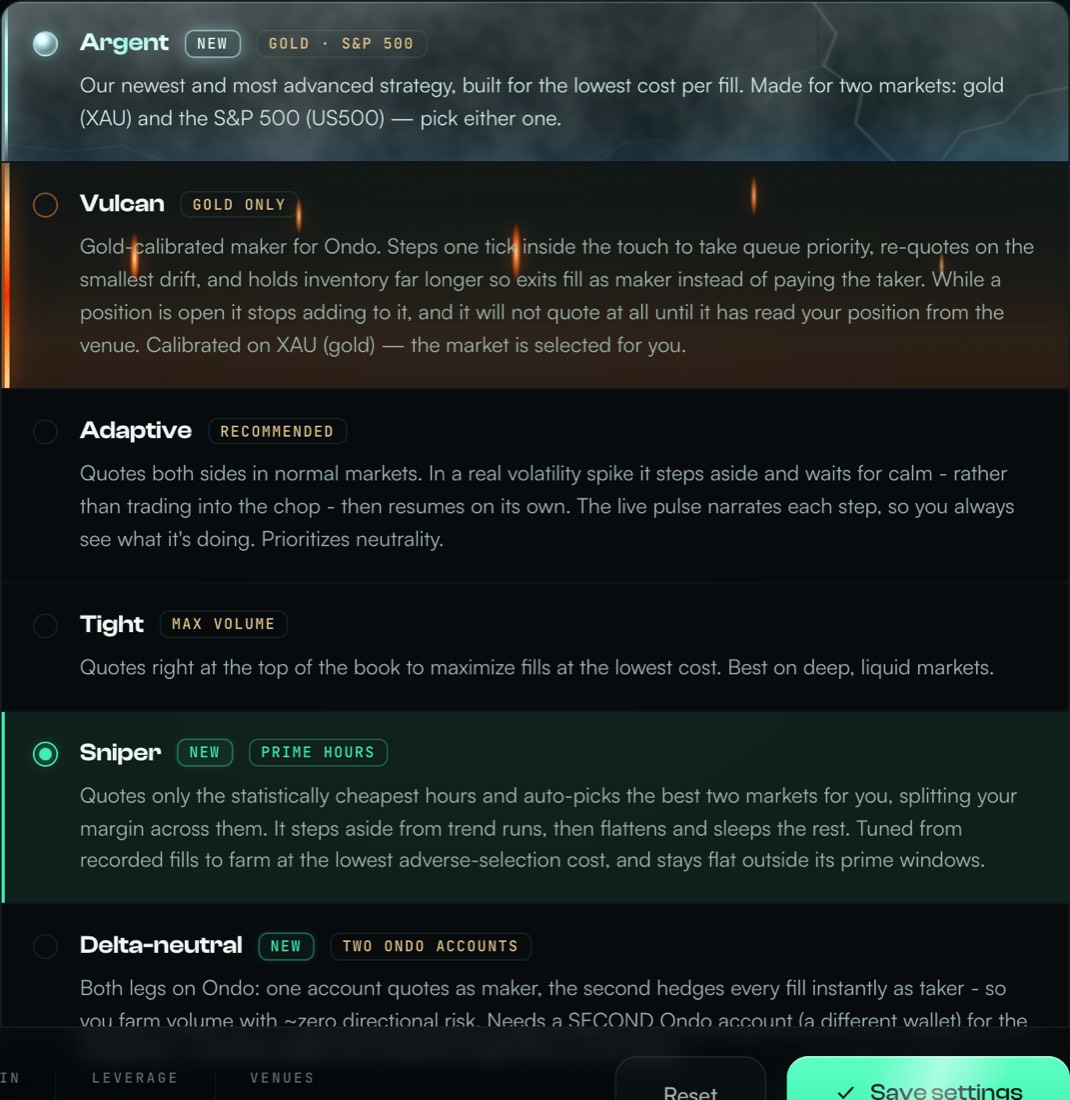
Where it sits in the list, below the two single-market modes.

Historical summary: coin Auto, stop off, $100 margin and 20× leverage. These are screenshot values, not a sizing recommendation.
Do not disable or widen a stop merely to avoid interruptions. Choose limits for the loss and exposure you can accept, then confirm they apply to this mode. A stop requests an exit; it does not guarantee execution at a particular price.
How much it puts to work
You set two things: how much collateral to deploy and the leverage. Together they give the buying power, and Vesper sizes each order and the inventory ceiling from that. Remember that in Sniper the margin is split between two markets, so each leg gets about half of what a single-market mode would use.
Review size, leverage, selected markets and limits, then press Start and complete the requested authorization. Within a window, readiness checks precede quoting. Outside it, the session may wait for its next window. Check the actual status and errors; neither a signature nor elapsed time proves orders are active.

Read CPM alongside realised P&L, fees, applicable rebates, funding and open inventory. A small fill sample is noisy; no fixed turnover guarantees a stable estimate or future results.
Reading the dashboard, including the quiet parts
The Pulse card describes session activity. Read it alongside actual orders, positions and any fault message. The examples below describe the documented release, not proof that your current session is healthy.
- Sleeping
“Sniper: sleeping — outside prime hours; next window 03:00 UTC.” This indicates a scheduled wait. Independently confirm zero positions and no open orders on all affected markets; the label alone does not prove cleanup.
- Making markets
The mode is quoting. Confirm the actual buy and sell orders for the selected markets; a dashboard label can lag venue state.
- Working off inventory
It is holding a position and quoting only the side that reduces it, as a maker, to avoid paying the taker fee on the way out.
- Holding for calm
Price ran and it stepped aside deliberately. After four fills in a row on the same side within a minute it widens by 1.5 basis points and waits in the documented release. This guard cannot prevent every adverse move or loss.
No fills may reflect a scheduled pause, unfilled quotes or a fault. Check the current UTC window, session status, orders and positions rather than diagnosing from inactivity alone.
What it does differently inside a window
- Queue-aware quoting
It looks at how much size is ahead of it at the best price. When the queue is thick it does not bother fighting for a spot it will not reach.
- Anti-run
Four same-side fills inside a minute and it backs off for 45 seconds. This is intended to reduce repeated one-sided fills; it cannot prevent every adverse move.
- Patient exits
It gives an exit five minutes to fill as a maker before requesting a taker exit in the documented release. Taker execution adds cost but waiting also carries price risk. Neither route guarantees a fill deadline.
- Inventory exit triggers
The mode uses holding-time and adverse-move triggers to request exits. A time limit is not a guarantee of a fill by that deadline: venue availability and liquidity still matter.
Stop and verify every market
Use Pause / Stop and complete the requested authorization. Wait for the terminal status, then independently check zero positions and no open orders on every affected venue market and review History. Cleanup may incur taker fees and realise a loss. If it fails or remains unknown, do not start another session; inspect the venue and contact support. Revoking a key does not itself cancel existing orders or close positions.
Before you start
- Do I really need the referral code?
- This guide uses the existing invite link and code
867C4M. Check current eligibility, referral terms and existing-account compatibility before funding; this is not a current access guarantee. - Why does my session show no activity?
- The documented weekday windows are 03:00–10:00 and 21:00–24:00 UTC. Check the current dashboard schedule, status and faults. Inspect positions and orders to confirm cleanup: inactivity alone does not prove a flat account or a healthy session.
- Can I tell it which market to trade?
- Not in Sniper — choosing is the feature. If you want to pin one market yourself, use Argent for gold or the S&P 500, or Vulcan for gold.
- How much money does it need?
- The documented mode splits margin between two markets. Check each actual order size against current venue minimums and your risk limit before Start. Do not raise leverage simply to bypass a size minimum; it increases exposure and liquidation risk.
- Can it withdraw my funds?
- Use trading-only permissions and verify the actual authorization scope and revocation controls on the venue. Do not assume permissions from this guide. Even a non-withdrawing key can make losing trades; revocation alone does not close positions or cancel orders.
What Sniper cannot do
Trade all day. Roughly ten hours out of twenty-four on weekdays. If you want volume above all else, this is the wrong mode.
Let you choose the market. It picks two and splits your margin between them.
Promise a return. Turnover is not earnings. Spread capture can be outweighed by fees, adverse fills and inventory losses. A session can finish with a loss.
Remove account risk. Restrict permissions, inspect exposure and verify completed cleanup. Trading-only access is not risk-free.
Code 867C4M. Account created? Review connection settings.
Other Vesper guides
All guides · How market making works · About Vesper · Ask the community · Discord